View your EPFO pension passbook and account statement through the Umang app. Android smartphone users can now install the official Umang mobile application from the Google Play Store to explore various services for pensioners: The Employees' Provident Fund Organisation (EPFO) has introduced a convenient "View Pension Passbook" feature within the Umang app. As a retirement fund authority, the EPFO offers a wide range of digital services to its members. Pensioners can now effortlessly check their pension passbooks, statements, account information, and current balances online. Below, we provide a step-by-step guide on how to access your passbook details using the 'View Passbook' tool on the UMANG platform.
The EPFO offers several additional e-services via the Umang app, including Employee-Centric Services, Employer-Centric Services, General Services, Pensioner Services, and eKYC options. The "View Passbook" feature is conveniently located under the "Pensioner Services" category for all EPFO subscribers.
All eligible users can easily verify their account numbers, transaction-wise balances, branch codes, and other relevant data through this digital passbook. The complete process for pensioners to view their passbook is outlined below.
Access EPFO Pension Passbook Online via Umang App
Follow these steps to view your pension passbook and statement using the Umang app:
STEP 1: First, download the UMANG application from the Google Play Store or click this link to get started.
STEP 2: Once the app is downloaded, install it and sign in using your mobile number, Aadhaar, Google, Facebook, or Twitter credentials.
STEP 3: On the Umang dashboard, locate and tap on the "Social Security" category as shown below:
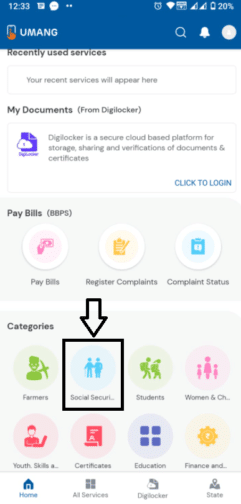
STEP 4: The Social Security Services page will appear; click on the "EPFO" icon to proceed: