The Election Commission of India (ECI) introduced the e-EPIC (Electronic Electoral Photo Identity Card) on January 25, 2021. The facility for downloading digital voter ID cards officially began on National Voters' Day. Union Minister Ravi Shankar Prasad inaugurated the e-EPIC initiative and handed out digital voter cards to five first-time voters. This marks the first instance of the government issuing voter IDs in a digital format, joining other established digital identity documents like the Aadhaar card, PAN card, and driver's license.
Download National Voter ID Card
To exercise your right to vote, you must ensure your name is registered in the official voter list. You can verify your enrollment and download your voter card with a photo. The NVSP portal is the primary platform provided by the Election Commission to simplify the process of applying for a voter ID, checking application status, updating personal details, and printing your voter identity card.
Voting is a fundamental constitutional right and a vital pillar of Indian democracy. Every citizen should actively participate in elections to choose their representatives for a government that truly serves the people.
Voter Registration - Adding Name to the Electoral Roll
If you are a new voter and your name is not currently in the electoral roll, you can apply for a new voter ID card online by following these steps:
- Visit the official National Voters Service Portal at https://www.nvsp.in/
- On the main page, select the option for "Apply online For Registration of New Voter / Due to Shifting From AC" or use this direct link
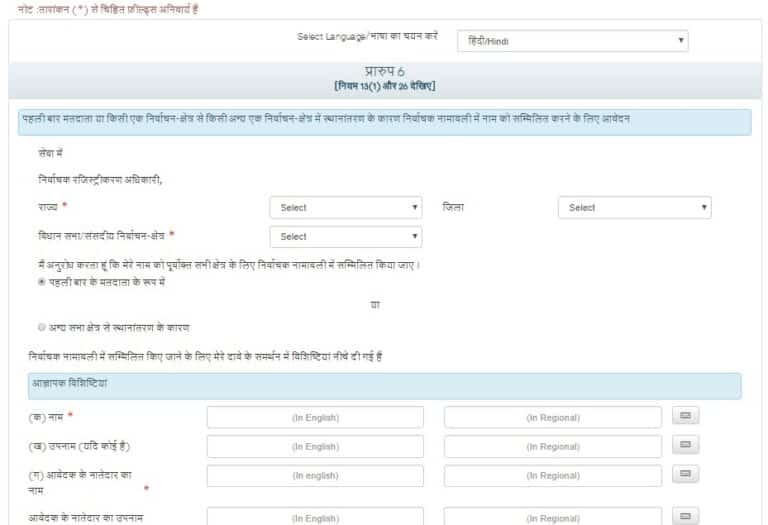
- Provide your personal information accurately and upload the required documents, including a recent photograph, proof of age, and proof of residence, then click "Submit."
- Overseas Voters - Non-resident Indian citizens should complete 'Form 6A' for registration, accessible via this link: Tags: Sarkari Yojana List Voter Id Card Download