The Central Government has introduced the e-Sahaj Portal for processing security clearances, accessible at https://esahaj.gov.in/. This platform enables organizations, business firms, companies, and private individuals to request security clearances remotely via the internet. The e-Sahaj system simplifies the submission of online applications and allows applicants to monitor the status of their requests in real time. Interested parties can complete their e-Sahaj Security Clearance registration directly at esahaj.gov.in.
The e-Sahaj Portal ensures a more transparent, efficient, and streamlined process for obtaining necessary clearances. Relevant authorities can review applications and supporting documentation digitally to provide timely decisions. The National Informatics Center (NIC) built this security clearance portal, while individual ministries maintain and oversee their respective content.
The Ministry of Home Affairs (MHA) has optimized its security clearance protocols and established updated guidelines. A committee consisting of senior officials convenes weekly to ensure prompt resolution of clearance requests.
e-Sahaj Security Clearance Online Registration Guide 2026
Follow the steps outlined below to register for security clearances through the e-Sahaj portal:
STEP 1: Navigate to the official website at https://esahaj.gov.in/
STEP 2: On the main page, select the "Registration" button located in the navigation menu.
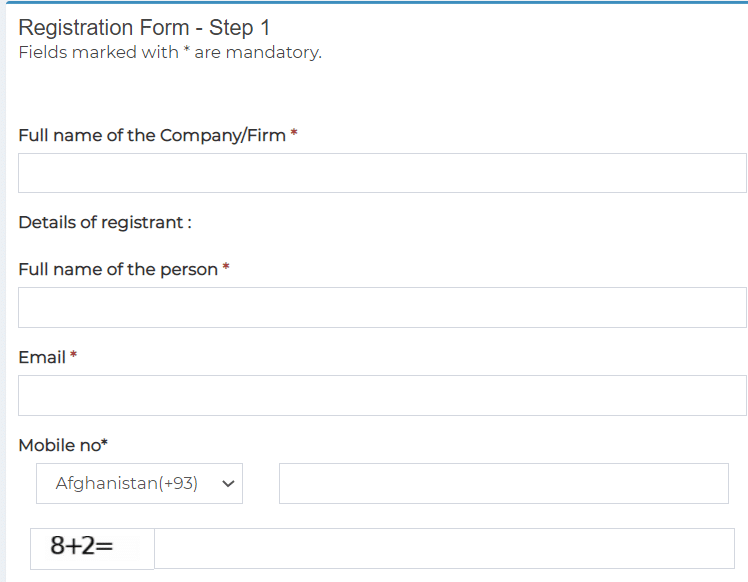
STEP 3: This section is for registering companies, firms, or organizations. Registration is a one-time process performed by an authorized representative. You will be verified via an OTP, and you must upload valid identity documentation.
STEP 4: Individuals seeking security clearance must register themselves using their own details on the portal.
STEP 5: After the initial step, a verification link will be sent to your email. Upon successful registration, you will receive a Login ID via email and a password on your registered mobile number.
Once registered, log in to the portal to complete and submit the security clearance application. Refer to the User Help Manual for details on available features, clearance types, and portal functions. After submitting your application, it is recommended to keep a printed copy for your records.