eCourts Portal / App: Central government has introduced two convenient methods to access your court case details anytime and anywhere through the e-Courts India Services mobile application and the official eCourts website. Citizens can now retrieve comprehensive case information across India using the CNR number, party name, case number, filing number, advocate name, FIR number, or act type via the services.ecourts.gov.in website or the e-Courts Services app. Users can also receive alerts regarding upcoming hearing dates.
The eCourts portal and mobile application also allow users to search for caveats and obtain copies of court judgements. A unified mobile app is available for both High Court and District Court cases, providing seamless access to case proceedings, hearing schedules, and verdicts. Furthermore, the e-Courts services mobile app enables users to view full case details simply by scanning a QR code.
How to View Case Details on the eCourts Portal (services.ecourts.gov.in)
The eCourt India services portal allows users to search for case information using various parameters, including the CNR number, party name, case number, filing number, advocate name, FIR number, or act type.
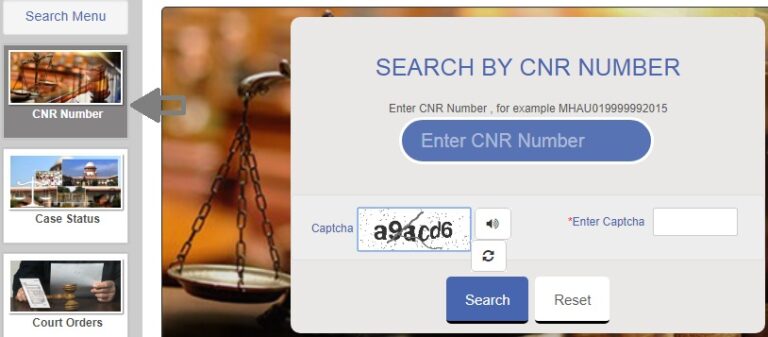
eCourt India Services - Access Case Info via CNR Number
Follow these steps to retrieve case details using your CNR number:
STEP 1: Access the official eCourts website at https://services.ecourts.gov.in/ecourtindia_v6/
STEP 2: The homepage defaults to the CNR number search tool, as displayed in the image below: