The 2026 Odisha Voter List has been officially published by the Chief Electoral Officer at https://ceoodisha.nic.in/en/. Citizens can now access the electoral roll with photos, download the PDF files, and manually locate their details within the documents. Additionally, users can verify their registration status online through the Odisha electoral roll search portal. Residents are also able to download their Voter ID cards directly from the official website.
Citizens can verify their registration status in the updated 2026 district-wise Odisha Voter List PDF to ensure they are eligible to vote. Since the 2026 Odisha Voter List is provided in PDF format, you can easily look up your name and record your serial number before visiting your designated polling station.
The complete 2026 Odisha Electoral Roll in PDF format is now accessible. Citizens can conduct manual searches within these files or opt for a more convenient online verification process to confirm their details.
Download 2026 Odisha Voter List (PDF Electoral Rolls)
Follow the steps below to download the official 2026 Odisha electoral rolls (Voter List with Photo):
STEP 1: Start by visiting the Election Commission of India’s dedicated electoral roll portal: https://voters.eci.gov.in/download-eroll
STEP 2: Once on the page, choose "Odisha" from the 'State Name' dropdown menu. A list of districts will appear; select your specific district from the options provided.
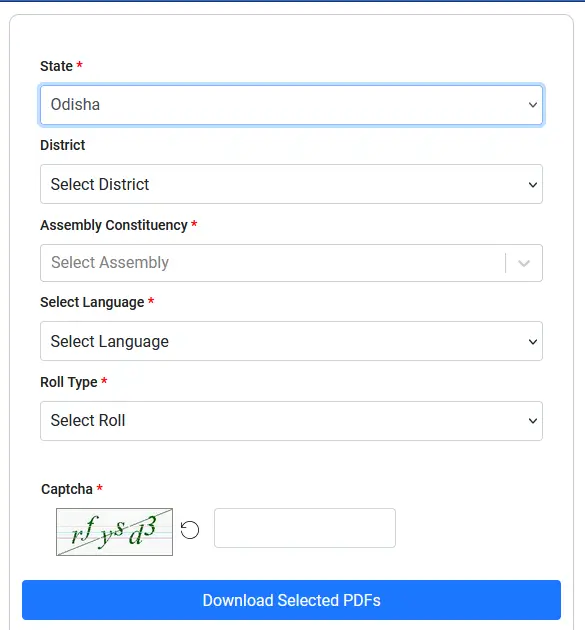
STEP 3: Since districts are divided into administrative zones, select your Assembly Constituency. Then, choose your preferred language (e.g., Odia, English, Hindi, or Telugu) to generate the PDF.

STEP 4: The system offers various versions like Final Electoral Roll, Draft Roll, or Supplementary Roll. Select the most recent Final Roll for the latest data. Next, identify your polling station or area by selecting the corresponding Part Number.

STEP 5: After entering your details, input the Captcha code shown on the screen and click the "Download Selected PDF's" button. The file will save to your device as shown below:
