The Aadhaar PVC Card is a modern service introduced by the Unique Identification Authority of India (UIDAI). This digital facility allows Aadhaar holders to have their identification details printed onto a durable PVC card for a small fee. Citizens can easily request their PVC Aadhaar through the official portal at resident.uidai.gov.in. This new version is designed to be compact, making it simple to store in your wallet just like a bank card.
Residents who do not have their mobile number linked to their Aadhaar can still order the PVC card using an alternative or non-registered mobile number. The updated Aadhaar PVC card is robust, visually appealing, and incorporates advanced security elements, including a hologram, a Guilloche pattern, a ghost image, and microtext.
In this guide, we will walk you through the step-by-step process of applying for your Aadhaar PVC card on the official UIDAI website. The Central govt. has made the Aadhaar card a mandatory document for accessing various welfare schemes and government services, making it an essential piece of identification.
How to Request Your Aadhaar PVC Card Online
Follow these instructions to order your PVC Aadhaar card online:
Step 1: To begin your application, navigate to the official UIDAI resident portal at https://resident.uidai.gov.in/
Step 2: Locate the "My Aadhaar" menu on the homepage and select the "Order Aadhaar PVC Card" option.
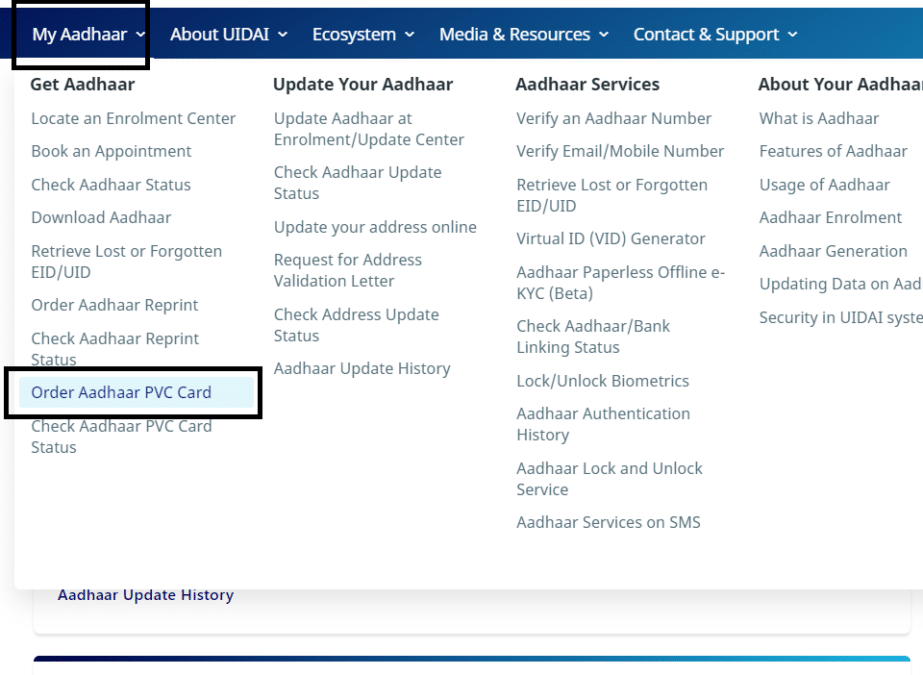
Step 3: Once clicked, you will be directed to the PVC card order page as displayed below: