Central government has initiated the 2026 Parivesh Portal registration and login services at parivesh.nic.in. PARIVESH is an acronym for Pro-Active and Responsive facilitation by Interactive, Virtuous and Environmental Single-window Hub. This guide explains the step-by-step process for submitting online applications for environmental, forest, wildlife, and CRZ approvals.
Overview of the PARIVESH Portal
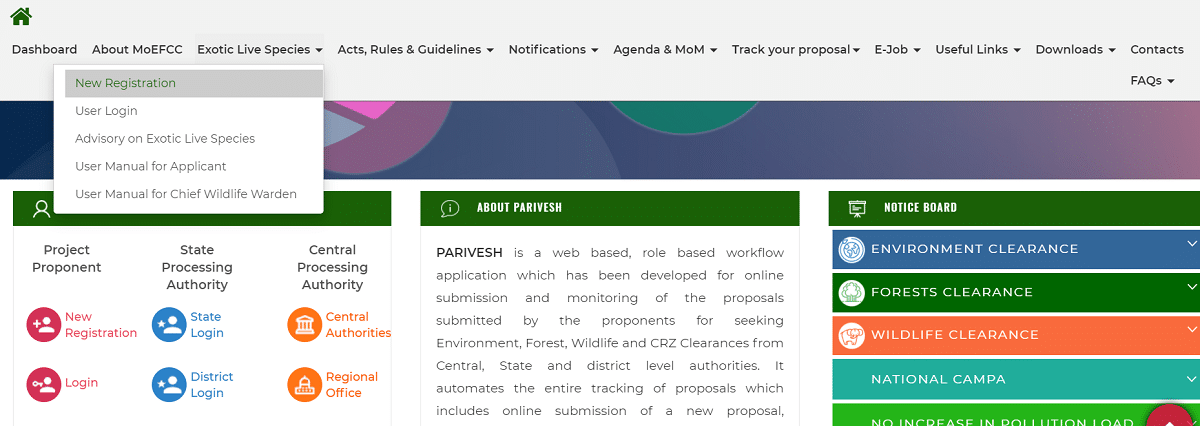
PARIVESH is a web-based, role-oriented workflow system designed for the digital submission and oversight of proposals requesting Environment, Forest, Wildlife, and CRZ clearances from authorities at the central, state, and district levels. It streamlines the entire tracking process, allowing users to submit new applications, modify existing project details, and monitor status updates throughout the approval cycle.
2026 Parivesh Portal Registration & Login
The Parivesh Portal aims to boost efficiency, transparency, and accountability regarding EC, FC, Wildlife, and CRZ clearance procedures. Below is the comprehensive guide for registering and signing into the portal for 2026:
STEP 1: Navigate to the official Parivesh website at http://parivesh.nic.in/
STEP 2: On the main page, select the "New Registration" button as indicated in the image below:
STEP 3: Direct Registration Link - https://parivesh.nic.in/newupgrade/#/userRegistration
STEP 4: You will be redirected to the PARIVESH registration form as shown here: